


MedStar eVisit – Telehealth
3.9383.00 Reviews
App Specs
- Version
- 16.1.0
- Updated On
- License
- Free
- Downloads
- 100,000+
- Developer
- MedStar Health
- Categories
- Medical
- Platform
- Android
Screenshots

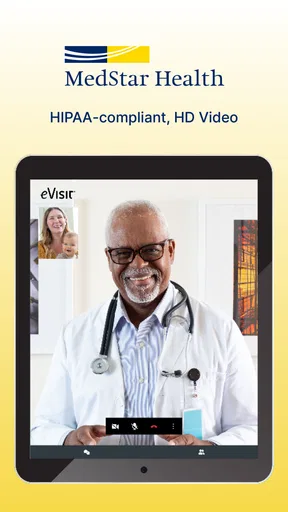
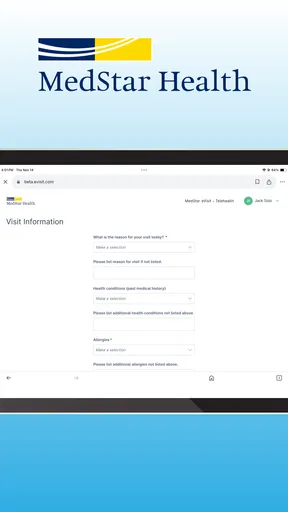
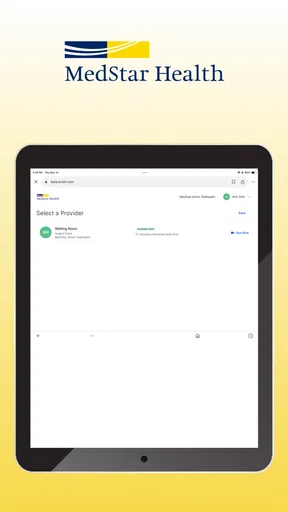
 Analysis by AppCompare
For a virtual medical visit, a strong connection is part of the care experience, not just a technical detail. I find that MedStar eVisit – Telehealth makes the most sense when I can settle somewhere private, keep my phone or tablet connected, and give the conversation my attention. It is designed for remote urgent care, so it can save a trip for an issue that is suitable for a clinician to assess online. It is not a substitute for emergency care or every in-person examination, though, and knowing that boundary makes it easier to choose the right option.
When the visit depends on a steady connection
A virtual appointment relies on an internet connection at the moments that matter most: signing in, arranging the visit, and speaking with a provider. A dropped call or patchy signal can interrupt a conversation just when you are describing symptoms or listening to advice. I would treat a stable Wi-Fi or mobile connection as part of preparing for the appointment rather than assume the app will work smoothly in every location.
That changes where I would use it. A quiet room at home is usually a better choice than a moving car, a crowded café, or a spot with weak reception. Before the appointment, I’d check that the device is connected and that I can hear clearly. If I am using mobile data, I’d also consider whether the signal is reliable where I plan to sit. Those small steps reduce avoidable distractions without turning a health visit into a technical project.
Choosing the right place and moment
The app is most useful when the convenience of remote care solves a real problem: I am at home with a non-emergency concern, travel is difficult, or fitting an in-person appointment around work or family would be a challenge. A parent might use a quiet moment after a child’s symptoms appear, while someone working from home could speak with a provider without adding a commute. The practical benefit is not that every concern can be handled on a screen; it is that an appropriate concern may be discussed without leaving the place where I am already resting.
Privacy deserves a little planning, too. A video conversation about health can feel personal, so I would choose a spot where I can speak openly and where other people are unlikely to overhear. Headphones may help in a shared home, provided I can still hear the clinician clearly. If I am outside or in transit, I would wait until I can stop somewhere safe and private instead of trying to manage an appointment while distracted.
What to do if the connection falters
If the video or audio becomes unreliable, I would first move to a place with a stronger signal, reconnect to a stable network if one is available, and follow the app’s on-screen instructions. I would avoid assuming that a visit has continued successfully just because the screen remains open. If the interruption affects the conversation, the important thing is to make sure the provider has heard the symptoms and that I understand the next steps before I consider the consultation complete.
This is one reason I would not leave a virtual appointment until the last few minutes of a break or start it while walking between errands. A connection problem can take time to sort out, and a rushed recovery may leave me unsure about the advice. If I cannot establish a usable conversation, contacting the healthcare service through an appropriate available route or choosing in-person care may be more sensible than repeatedly trying in a poor-signal location.
Worth Reading Before You Choose

EA SPORTS FC Mobile 26 Is a Bigger Football Game, but It Takes Time

Flipboard Shows What News Apps Must Do Beyond the Feed

Switching to Android Auto Means Rethinking Your Driving Routine

Google Calendar Makes a Crowded Week Easier to Manage

Ludo King Makes the Most of the Minutes Between Plans

Baby Panda World Brings Quick Play to Modern Phones, but Its Game Library Feels Busy
Using mobile data thoughtfully
Video visits can use more mobile data than a brief text exchange, so I would prefer Wi-Fi when it is dependable and private. If Wi-Fi is not practical, checking the strength of the mobile signal and leaving enough time for the appointment are simple ways to avoid surprises. I would not switch to an open public network just for convenience when discussing personal health information; a private, trusted connection is a better trade-off.
It also helps to prepare what I want to explain before joining. I might note when the problem began, what has changed, and what I have already tried. That keeps the conversation focused if the connection is not perfect and makes better use of the clinician’s time. I would keep any relevant medication or symptom details close at hand, while avoiding unnecessary sensitive information on a shared screen or in a public place.
For a serious or rapidly worsening problem, I would not let the convenience of a video option delay urgent in-person help. Remote care works best when a clinician can reasonably assess the concern through a conversation and visual information. Some issues need a physical examination, tests, or immediate treatment that a phone-based visit cannot provide. In those cases, a clinic, urgent care center, or emergency service is the more appropriate choice.
There is also a useful distinction between a one-off urgent concern and ongoing care that depends on a complete medical picture. A virtual clinician can be a convenient starting point, but someone managing a complex condition may benefit more from a provider who already knows their history and can coordinate examinations or testing. I would view remote urgent care as one route into care, not automatically as a replacement for a regular clinician.
What’s the Deal with MedStar eVisit?
Let’s dive into what makes MedStar eVisit such a game-changer. Imagine being able to consult with a healthcare professional without the commute, the waiting room magazines from 1995, and the awkward eye contact when your name finally gets called. This app lets you connect via video, talk about what’s ailing you, and get advice or prescriptions sorted out from the comfort of your couch.
Now, I know what you’re thinking – how legit is this? Well, MedStar Health isn’t new to the game. They’ve been around, offering reliable healthcare services for years. This app is just their way of keeping up with the times and making healthcare more accessible and convenient for everyone.
MedStar eVisit is a medical app from MedStar Health, offered free of charge and rated for everyone. It has a 4.0 average from around 894 ratings, with over 100K installs, which suggests it has found a sizeable audience without telling me whether it will suit every person or situation. It first appeared on July 31, 2015, and version 16.1.0 supports Android 5.0 and later. For someone comparing options, those details make it clear that this is an established service rather than a new, untested download, but the real question is whether remote urgent care fits the need at hand.
Setting Up is a Breeze
The first thing I noticed is how easy it is to get started. You download the app from your app store (available for both Android and iOS), sign up, and bam! You’re ready to go. The interface is user-friendly, with big icons and clear instructions guiding you every step of the way. Even if you’re not super tech-savvy, you’ll find it pretty intuitive.
Even a straightforward sign-up is only one part of being ready for a visit. I would set up the account before feeling unwell, while I have time to read the prompts and enter information carefully. That way, I am less likely to be working through account steps while uncomfortable or trying to fit a consultation between other responsibilities. I would also keep my device charged, because a video conversation is not the moment I want to discover that the battery is nearly empty.
Another useful habit is to check that the device’s camera and microphone work in the place where I expect to take the call. I would try the basics before the appointment rather than wait until the provider is ready. This is not a hidden feature; it is a practical way to remove a common source of friction from any video consultation. If I share a device with family, I would also make sure I can access my account privately and have enough space to talk without interruption.
The Virtual Visit Experience
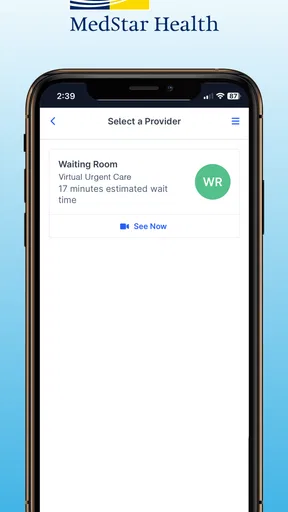
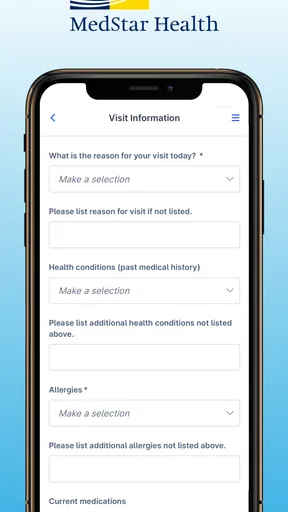
Once you’re set up, booking a virtual visit is straightforward. You select the type of service you need, choose a provider, and pick a time that works for you. I love that there are options. Whether you’ve got a sudden rash or you’re managing a chronic condition, there’s someone available to help.
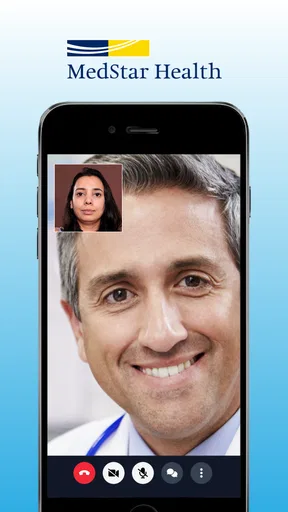
When the time for your appointment rolls around, you receive a notification, and you’re directed to a secure video call. It’s like FaceTiming but with less awkwardness and more medical expertise. The doctors I interacted with were professional, attentive, and seemed genuinely interested in helping. That’s not something you always get in a rushed in-person visit.
A realistic use case might be noticing a mild but worrying skin change at home after the day’s appointments are over. Instead of guessing from search results, I could use the app to explain when it appeared, describe whether it has changed, and show the area on camera if that is useful to the conversation. The provider can then advise on what to do next. If the concern needs an examination that video cannot support, the visit can still help me understand that I should seek in-person care rather than keep guessing.
That is where the app differs from the usual alternatives. Searching symptoms online is immediate but can send me down an alarming rabbit hole without assessing my particular situation. A standard clinic appointment offers an in-person examination, which is better when hands-on assessment matters, but it requires travel and fitting the visit into a schedule. MedStar eVisit sits between those options: a conversation with a healthcare professional from a remote setting, most useful when the concern is appropriate for virtual assessment and speed or convenience matters.
I would not choose it simply because an issue is inconvenient to discuss in person. Some symptoms need tests, a physical examination, or prompt hands-on care. Nor would I assume that a video visit replaces an established relationship with a primary care clinician, especially for complex or continuing health needs. The better choice depends on the concern: remote urgent care for a suitable, time-sensitive question; a regular clinician for coordinated ongoing care; and an in-person service when examination or immediate treatment is important.
Key Features I Loved
- 24/7 Availability: No more waiting until Monday morning to ask a simple question. They’ve got you covered around the clock.
- Prescription Services: If you need meds, they can send the prescription directly to your pharmacy. Convenient, right?
- Follow-up Visits: It’s easy to schedule follow-ups if you need them, ensuring you get the care continuity you might require.
For a prescription-related question, I would treat the consultation as a discussion rather than expect a particular medication automatically. The clinician needs to decide what is appropriate, and a prescription is not guaranteed simply because I request one. If a prescription is issued, knowing which pharmacy I want to use before the conversation can help keep the next step clear. For follow-up care, I would ask what symptoms should prompt another visit and what changes mean I should switch to in-person help.
Another aspect worth mentioning is the peace of mind this app brings. If you’re like me and tend to Google symptoms (bad idea, by the way), having a professional to consult can save you a ton of unnecessary stress.
That reassurance has limits, and I think it is healthier to be clear about them. A virtual appointment can help me make a more informed decision, but it cannot guarantee a diagnosis or make uncertainty disappear. The most useful outcome may be advice on what to monitor, how to manage a concern, or where to go next. I would finish the visit by repeating back the plan in my own words, especially if I have been distracted or the connection has interrupted part of the discussion.
Wrapping It All Up
In a world where life moves fast and not everyone has time to sit in a waiting room, MedStar eVisit – Telehealth offers a practical solution. It’s reliable, user-friendly, and backed by a reputable healthcare provider. For anyone juggling a hectic schedule or simply looking for a more convenient way to manage their health, this app is a must-try.
For me, its strongest case is a non-emergency concern that feels worth discussing with a clinician but does not obviously require an in-person examination. It is a good fit for people comfortable using video, able to find a reasonably private place, and connected well enough to hold a conversation. Someone without dependable internet access, someone who dislikes discussing health over video, or anyone whose symptoms call for a physical assessment may be better served by a clinic or another care route.
So, next time you’re feeling under the weather but can’t quite make it to the doctor, give MedStar eVisit a whirl. It’s like having a healthcare professional on speed dial, ready to help you feel your best.
My practical verdict is to prepare the connection, choose a quiet place, and use the service for the kind of concern a clinician can reasonably assess remotely. If the signal fails, the privacy is not there, or the symptoms seem urgent, I would switch plans rather than force the video visit to work. With that judgment, this app can be a convenient part of getting care, not a substitute for every kind of care.
Pros
- Convenient access to healthcare professionals.
- User-friendly interface for easy navigation.
- Secure communication ensures privacy.
- Available 24/7 for urgent care needs.
- Supports multiple languages for diverse users.
Cons
- Requires stable internet for smooth operation.
- Not all insurance plans may be accepted.
- Limited to specific regions for service.
- Potential wait times during peak hours.
- Some features require additional fees.
FAQs for MedStar eVisit – Telehealth
What is MedStar eVisit and how does it work?
MedStar eVisit is a telehealth application that allows users to connect with healthcare providers virtually. After creating an account, users can schedule appointments or initiate on-demand consultations with doctors for various medical issues. The app facilitates secure video calls, enabling users to receive diagnoses, treatment plans, and prescriptions without visiting a healthcare facility.
Is MedStar eVisit covered by insurance?
Insurance coverage for telehealth services like MedStar eVisit often depends on your specific insurance plan. Many insurers cover telehealth visits, but it's crucial to check with your provider to understand your coverage details, co-pays, and any potential out-of-pocket costs before using the service.
What types of medical conditions can be treated using MedStar eVisit?
MedStar eVisit is suitable for non-emergency medical conditions such as colds, allergies, skin conditions, and minor injuries. It also offers mental health consultations. However, it is not recommended for emergencies, life-threatening conditions, or when immediate physical examinations are necessary.
How secure is my personal information on MedStar eVisit?
MedStar eVisit prioritizes user privacy and data security. The app complies with HIPAA regulations, ensuring that all personal and medical information is encrypted and securely stored. Users can feel confident that their data is protected during and after virtual consultations.
Can I use MedStar eVisit on both Android and iOS devices?
Yes, MedStar eVisit is available for download on both Android and iOS platforms. Users can access the app through the Google Play Store or the Apple App Store. Ensure your device meets the necessary software requirements to guarantee optimal performance of the application.


